Oracle
has two products that implement Java Platform Standard Edition
(Java SE) 8: Java SE Development Kit (JDK) 8 and Java SE Runtime
Environment (JRE) 8.
JDK 8 is a superset of JRE 8, and contains everything that is in
JRE 8, plus tools such as the compilers and debuggers necessary for
developing applets and applications. JRE 8 provides the libraries,
the Java Virtual Machine (JVM), and other components to run applets
and applications written in the Java programming language. Note
that the JRE includes components not required by the Java SE
specification, including both standard and non-standard Java
components.
The following conceptual diagram illustrates the components of
Oracle's Java SE products:
Description
of Java Conceptual Diagram
Friday, October 6, 2017

Monday, August 28, 2017
How can I get the user input in Java?
You can use any of the following options based on the requirements.
Scanner class
import java.util.Scanner;
Scanner scan = new Scanner(System.in);
String s = scan.next();
int i = scan.nextInt();
BufferedReader and InputStreamReader classes
import java.io.BufferedReader;
BufferedReader br = new BufferedReader(new InputStreamReader(System.in));
String s = br.readLine();
int i = Integer.parseInt(br.readLine());
DataInputStream class
import java.io.DataInputStream;
DataInputStream dis = new DataInputStream(System.in);
int i = dis.readInt();readLine method from the DataInputStream class has been deprecated. To get String value, you should use the previous solution with BufferedReader
Console class
import java.io.Console;
Console console = System.console();
String s = console.readLine();
int i = Integer.parseInt(console.readLine());Friday, August 4, 2017
Why is Java standard library larger when compared to C++'s standard library?
Sergey Zubkov, C++ programmer

C++
standard library, just like the rest of the C++ language specification,
is a set of interfaces and requirements. Each compiler vendor writes
their own implementation of the interfaces that satisfies those
requirements.
To add a new component to the C++ standard library, you not only have to write your own implementation, you would have to convince Microsoft, IBM, HP, Oracle, Intel, GCC, Clang, and other C++ compiler representatives that it's worth spending their developers' time to implement and test and deploy this new component. In most cases, the things that you find in the C++ standard library are the things that have been in use for a decade prior.
To add a new component to Java, you just have to implement it once.
To add a new component to the C++ standard library, you not only have to write your own implementation, you would have to convince Microsoft, IBM, HP, Oracle, Intel, GCC, Clang, and other C++ compiler representatives that it's worth spending their developers' time to implement and test and deploy this new component. In most cases, the things that you find in the C++ standard library are the things that have been in use for a decade prior.
To add a new component to Java, you just have to implement it once.
RecommendedAll

Because
it's defined by one company (formerly Sun, now Oracle) to serve its
interests with one implementation not committees representing varied
users a subset of which must implement any new standard.
A better comparison might be between the standard Java library and boost libraries which run on all popular platforms and are also defined outside a slow committee based standardization process.
A better comparison might be between the standard Java library and boost libraries which run on all popular platforms and are also defined outside a slow committee based standardization process.

Size
doesn't make up for quality. The Java standard library is big, but
sometimes it's bigger than it should have been, and that's mostly due to
the fact that Java grew depending on the commercial needs of Sun
Microsystems. The Java framework is everything that Sun Microsystems
wanted to be, and there's a lot of things that you'll never need for a
Java application. The Java frameworks also grew with technology, and
everything is there for backward compatibility. However, when you look
at the Java for devices edition (Java MicroEdition), you will see that
the standard library/framework is still quite large.
The problem is that Java has to deliver a full interface for an operating system, an interface that it extends with its own constructs. It has to have file management, it has to have threads management, it has to have a lot of stuff that would be too slow if implemented in Java (for example parsing of XML files). All these add-up.
On the other hand, for a very long time the C++ standard library defined just a set of containers and algorithms. Why? This was a design decision: you do have the freedom (and you're encouraged) to step outside the standard library and implement the things that you need, and only that. This way you won't have to pull huge constructs, remain small, remain efficient, remain fast. C++ also ensures that you don't ever pay for features that you don't need, for example reflection. All Java constructs have to support reflection (and pull the reflection engine in your application) because your code can be inspected at run time. This has tragic impact on the performance of your code.
The C++ programmer can choose not to work with the standard constructions either. I can start everything from scratch and scrap the standard library altogether. I can call only C code, and the operating system interfaces directly.
Of course, the lack of standardization is costly for the C++ developers in general, this is why the new standard (C++11/14) added support for more libraries. For example, it's the first time there is a standard model for threading: filesystem, XML parsing and other libraries are under scrutiny. But design by committee is never fast, and it will take some time until the standard library will grow to accommodate such things that are basic stuff in the higher level languages environments. With the clear advantage of choosing tried and well tested models (unlike many of the Java/C# APIs that had several iterations until they got to be the right way).
TL;DR: C++ chose to not enforce a standard library and left freedom to the developers, while Java chose productivity over performance.
The problem is that Java has to deliver a full interface for an operating system, an interface that it extends with its own constructs. It has to have file management, it has to have threads management, it has to have a lot of stuff that would be too slow if implemented in Java (for example parsing of XML files). All these add-up.
On the other hand, for a very long time the C++ standard library defined just a set of containers and algorithms. Why? This was a design decision: you do have the freedom (and you're encouraged) to step outside the standard library and implement the things that you need, and only that. This way you won't have to pull huge constructs, remain small, remain efficient, remain fast. C++ also ensures that you don't ever pay for features that you don't need, for example reflection. All Java constructs have to support reflection (and pull the reflection engine in your application) because your code can be inspected at run time. This has tragic impact on the performance of your code.
The C++ programmer can choose not to work with the standard constructions either. I can start everything from scratch and scrap the standard library altogether. I can call only C code, and the operating system interfaces directly.
Of course, the lack of standardization is costly for the C++ developers in general, this is why the new standard (C++11/14) added support for more libraries. For example, it's the first time there is a standard model for threading: filesystem, XML parsing and other libraries are under scrutiny. But design by committee is never fast, and it will take some time until the standard library will grow to accommodate such things that are basic stuff in the higher level languages environments. With the clear advantage of choosing tried and well tested models (unlike many of the Java/C# APIs that had several iterations until they got to be the right way).
TL;DR: C++ chose to not enforce a standard library and left freedom to the developers, while Java chose productivity over performance.

For all intensive purposes C++ became yet another also ran almost 20 years ago with the popular advent of Java.
The bickering, glacial, infighting multi corporate lumbering bureaucratic set of companies overseeing the standards committee insured that C++ would fail.
Gosling and Sun Microsystems, had purpose, focus and inspiration when creating Java. The Java language was not hamstrung by the now absurd backwards compatibility constraints that C++ had with C. Java efficiently addressed most of the structural problems instrinisic to C++.
These included things like the preprocessor, multiple inheritance, Java decreased dependency on the underlying OS using the Java virtual machine, etc ...
One of the other failures of C++ was the requirement that developers had to purchase third party libraries to obtain standard functionality. I had to write C++ code for 5 years. Companies like RogueWave SW had to create and sell their wares. I had to shop and search for basic tools. This as clumsy and economically inefficient just because C++ was lacking basic standard libraries. What good is an OOP language that had no reusable modules included ?
Java has addressed this problem for years by gradually adding and extending libraries to support code reuse and simplification. Yes for those who adopted Java almost two decades ago, this was a promise and hope that has been fulfilled. It was a leap of faith back then. In the mid 90's the difference between Java and C++ was far less. But it was clear to me at the time that C++ had big problems and Java offered a vision and a better road map.
Hence almost 20 years later, Java is still moving forward, C++ will never catch up.
The bickering, glacial, infighting multi corporate lumbering bureaucratic set of companies overseeing the standards committee insured that C++ would fail.
Gosling and Sun Microsystems, had purpose, focus and inspiration when creating Java. The Java language was not hamstrung by the now absurd backwards compatibility constraints that C++ had with C. Java efficiently addressed most of the structural problems instrinisic to C++.
These included things like the preprocessor, multiple inheritance, Java decreased dependency on the underlying OS using the Java virtual machine, etc ...
One of the other failures of C++ was the requirement that developers had to purchase third party libraries to obtain standard functionality. I had to write C++ code for 5 years. Companies like RogueWave SW had to create and sell their wares. I had to shop and search for basic tools. This as clumsy and economically inefficient just because C++ was lacking basic standard libraries. What good is an OOP language that had no reusable modules included ?
Java has addressed this problem for years by gradually adding and extending libraries to support code reuse and simplification. Yes for those who adopted Java almost two decades ago, this was a promise and hope that has been fulfilled. It was a leap of faith back then. In the mid 90's the difference between Java and C++ was far less. But it was clear to me at the time that C++ had big problems and Java offered a vision and a better road map.
Hence almost 20 years later, Java is still moving forward, C++ will never catch up.
Princeton Java Standard Libraries
Below is a table of the input and output libraries that we use throughout the textbook and beyond.
Using the standard libraries.
The file stdlib.jar bundles together all of our standard libraries into one file. There are a number of ways to access the libraries:- Current directory.
The easiest (but not the sanest) way to use the standard libraries
to download stdlib.jar and unjar it
in your current working directory.
Alternatively, you can download the individual .java files you need (such as StdIn.java) and put them in the same directory as the program you are writing. Then, compile and execute as usual.% jar xf stdlib.jar
This approach has the drawback that you need a copy of each .java file you need in each directory where you need it.% javac MyProgram.java % java MyProgram
- Classpath.
Put stdlib.jar in the same directory as
the program you are writing (but do not unjar it).
Then, compile and execute as follows:
The -cp flag sets the classpath. The . tells Java to look in the current directory for .java and .class files (such as MyProgram.java and MyProgram.class). The stdlib.jar tells Java to also look in the .jar file. On OS X, the : separates directories in the classpath; on Windows the ; separates directories.OS X / Linux ------------ % javac -cp .:stdlib.jar MyProgram.java % java -cp .:stdlib.jar MyProgram Windows ------------ % javac -cp .;stdlib.jar MyProgram.java % java -cp .;stdlib.jar MyProgram
- Configure your IDE. You can configure your IDE to automatically include stdlib.jar in the classpath. In DrJava, it is Preferences -> Extra Classpath -> Add.
Standard input and standard output.
StdIn.java and StdOut.java are libraries for reading in numbers and text from standard input and printing out numbers and text to standard output. Our versions have a simpler interface than the corresponding Java ones (and provide a few tecnical improvements). Average.java reads in a sequence of real numbers from standard input and prints their average on standard output.In.java and Out.java are object-oriented versions that support multiple input and output streams, including reading from a file or URL and writing to a file. Wget.java reads in data from the URL specified on the command line and save it in a file with the same name.
Binary standard input and standard output.
BinaryStdIn.java and BinaryStdOut.java are the analogs for binary data. Copy.java reads a binary file from standard input and writes it to standard output.
Standard drawing.
StdDraw.java is an easy-to-use library for drawing geometric shapes, such as points, lines, and circles. RightTriangle.java draws a right triangle and a circumscribing circle.% java RightTriangleBouncingBall.java illustrates how to produce an animation using standard drawing.

Your browser can not display this movie.
Be sure that Javascript is enabled and that you have Flash 9.0.124 or better.
Draw.java is an object-oriented versions that support drawing in multiple windows.
Standard audio.
StdAudio.java is an easy-to-use library for synthesizing sound. Tone.java reads in a frequency and duration from the command line, and it sonifies a sine wave of the given frequency for the given duration.
Image processing.
Picture.java is an easy-to-use library for image processing. Scale.java takes the name of a picture file and two integers (width w and height h) as command-line arguments and scales the image to w-by-h.

|

|

|
Q + A
Q. Can I use your code in my project?A. Our library stdlib.jar is released under the GNU General Public License, version 3 (GPLv3). If you wish to license the code under different terms, please contact our publisher to discuss.
Q. If I use a named package to structure my code, the compiler can no longer access the libraries in stdlib.jar. Why not?
A. The libraries in stdlib.jar are in the "default" package. In Java, you can't access classes in the default package from a named package. If you need to use our libraries with a named package, you can use the packaged version stdlib-package.jar.
Warning: if you are taking Princeton COS 126, you must use the default package verison of our libraries to facilitate grading.
==, .equals(), compareTo(), and compare()
Equality comparison: One way for primitives, Four ways for objects
| Comparison | Primitives | Objects |
|---|---|---|
a == b, a != b | Equal values | Compares references, not values. The use of == with object references is generally limited to the following:
|
a.equals(b) | N/A | Compares values for equality. Because this method is defined in the Object class,
from which all other classes are derived, it's automatically defined for every class.
However, it doesn't perform an intelligent comparison for most classes unless
the class overrides it. It has been defined in a meaningful way for
most Java core classes.
If it's not defined for a (user) class, it behaves the same as ==.
It turns out that defining equals() isn't trivial;
in fact it's moderately hard to get it right, especially in the
case of subclasses. The best treatment of the issues
is in Horstmann's Core Java Vol 1.
[TODO: Add explanation and example]
|
a.compareTo(b) | N/A | Comparable interface. Compares values and returns an int which tells if the values compare less than, equal, or greater than. If your class objects have a natural order, implement the Comparable<T> interface and define this method. All Java classes that have a natural ordering implement this (String, Double, BigInteger, ...). |
compare(a, b) | N/A | Comparator interface.
Compares values of two objects. This is implemented as part of the Comparator<T> interface,
and the typical use is to define one or more small utility classes that implement
this, to pass to methods such as sort() or
for use by sorting data structures such as TreeMap and TreeSet.
You might want to create a Comparator object for the following.
|
Comparing Object references with the == and != Operators
The two operators that can be used with object references are
comparing for equality (==) and
inequality (!=). These operators
compare two values to see if they refer to the same object.
Although this comparison is very fast, it is often not what you want.
Usually you want to know if the objects have the same value, and not whether two objects are a reference to the same object. For example,
if (name == "Mickey Mouse") // Legal, but ALMOST SURELY WRONGThis is true only if
name is a reference to the same object that
"Mickey Mouse" refers to. This will be false
if the String in name was read from input or computed (by putting
strings together or taking the substring), even though name
really does have exactly those characters in it.
Many classes (eg,
String) define the equals()
method to compare the values of objects.
Comparing Object values with the equals() Method
Use the equals() method to compare object values.
The equals() method returns a boolean value.
The previous example can be fixed by writing:
if (name.equals("Mickey Mouse")) // Compares values, not references.
Because the equals() method makes a == test first, it can be
fairly fast when the objects are identical. It only compares the values if
the two references are not identical.Other comparisons - Comparable<T> interface
Theequals method and == and != operators
test for equality/inequality, but
do not provide a way to test for relative values.
Some classes (eg, String and other classes with a natural ordering) implement
the Comparable<T> interface, which defines
a compareTo method. You will want to implement Comparable<T> in
your class if you want to use it with Collections.sort() or Arrays.sort() methods.
Defining a Comparator object
As described in the table above oncompare(), you can create
Comparators to sort any arbitrary way for any class.
For example, the String class defines the CASE_INSENSITIVE_ORDER comparator.
If you override equals, you should also override hashCode()
OverridinghashCode(). The hashCode()
method of a class is used for hashing in library
data structures such as HashSet and HashMap.
If you override equals(), you should override hashCode()
or your class will not work correctly in these (and some other) data structures.
Shouldn't .equals and .compareTo produce same result?
The general advice is that ifa.equals(b) is true, then
a.compareTo(b) == 0 should also be true.
Curiously, BigDecimal violates this.
Look at the Java API documentation
for an explanation of the difference.
This seems wrong, although their implementation has some plausibility.
Other comparison methods
String has the specializedequalsIgnoreCase() and compareToIgnoreCase().
String also supplies the constant String.CASE_INSENSITIVE_ORDER Comparator.
The === operator (Doesn't exist - yet?)
Comparing objects is somewhat awkward, so a === operator has been proposed. One proposal is thata === b would be the same as ((a == b) || ((a != null) && a.equals(b)))
Common Errors
- Using == instead of
equals()with Objects - When you want to compare objects, you need to know whether you should
use
==to see if they are the same object, orequals()to see if they may be a different object, but have the same value. This kind of error can be very hard to find.
References
- Ragenwald's blog entry What does Barbara Liskov have to say about Equality in Java? and the responses touch on all the equality issues.
Friday, July 28, 2017
PATH and CLASSPATH
This section explains how to use the
After installing the software, the JDK directory will have the structure shown below.
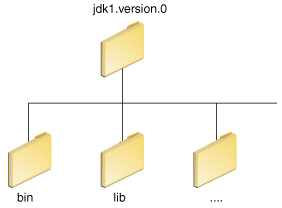
The
Set the
The
The following is an example of a
It is useful to set the
Windows XP
Note: You may see a
Variables enclosed in percentage signs (
To find out if the path is properly set, execute:
This will print the version of the
To set the path permanently, set the path in your startup file.
For C shell (
For
For
For
Then load the startup file and verify that the path is set by repeating the
For C shell (
For
The preferred way to specify the class path is by using the
The default value of the class path is ".", meaning that only the current directory is searched. Specifying either the CLASSPATH variable or the
To check whether
On Solaris or Linux, execute the following:
If
To modify the
Class path wildcards allow you to include an entire directory of
PATH and CLASSPATH
environment variables on Microsoft Windows, Solaris, and Linux. Consult
the installation instructions included with your installation of the
Java Development Kit (JDK) software bundle for current information.After installing the software, the JDK directory will have the structure shown below.
bin directory contains both the compiler and the launcher.Update the PATH Environment Variable (Microsoft Windows)
You can run Java applications just fine without setting thePATH environment variable. Or, you can optionally set it as a convenience.Set the
PATH environment variable if you want to be able to conveniently run the executables (javac.exe, java.exe, javadoc.exe, and so on) from any directory without having to type the full path of the command. If you do not set the PATH variable, you need to specify the full path to the executable every time you run it, such as:C:\Java\jdk1.7.0\bin\javac MyClass.java
PATH environment variable is a series of directories separated by semicolons (;). Microsoft Windows looks for programs in the PATH directories in order, from left to right. You should have only one bin
directory for the JDK in the path at a time (those following the first
are ignored), so if one is already present, you can update that
particular entry.The following is an example of a
PATH environment variable:C:\Java\jdk1.7.0\bin;C:\Windows\System32\;C:\Windows\;C:\Windows\System32\Wbem
PATH environment variable permanently so it will persist after rebooting. To make a permanent change to the PATH variable, use the System icon in the Control Panel. The precise procedure varies depending on the version of Windows:Windows XP
- Select Start, select Control Panel. double click System, and select the Advanced tab.
- Click Environment Variables. In the section System Variables, find the
PATHenvironment variable and select it. Click Edit. If thePATHenvironment variable does not exist, clickNew. - In the Edit System Variable (or New System Variable) window, specify the value of the
PATHenvironment variable. Click OK. Close all remaining windows by clicking OK.
- From the desktop, right click the My Computer icon.
- Choose Properties from the context menu.
- Click the Advanced tab (Advanced system settings link in Vista).
- Click Environment Variables. In the section System Variables, find the
PATHenvironment variable and select it. Click Edit. If thePATHenvironment variable does not exist, clickNew. - In the Edit System Variable (or New System Variable) window, specify the value of the
PATHenvironment variable. Click OK. Close all remaining windows by clicking OK.
- From the desktop, right click the Computer icon.
- Choose Properties from the context menu.
- Click the Advanced system settings link.
- Click Environment Variables. In the section System Variables, find the
PATHenvironment variable and select it. Click Edit. If thePATHenvironment variable does not exist, clickNew. - In the Edit System Variable (or New System Variable) window, specify the value of the
PATHenvironment variable. Click OK. Close all remaining windows by clicking OK.
Note: You may see a
PATH environment variable similar to the following when editing it from the Control Panel:
%JAVA_HOME%\bin;%SystemRoot%\system32;%SystemRoot%;%SystemRoot%\System32\Wbem
%) are existing environment variables. If one of these variables is listed in the Environment Variables window from the Control Panel (such as JAVA_HOME),
then you can edit its value. If it does not appear, then it is a
special environment variable that the operating system has defined. For
example, SystemRoot is the location of the Microsoft
Windows system folder. To obtain the value of a environment variable,
enter the following at a command prompt. (This example obtains the value
of the SystemRoot environment variable):
echo %SystemRoot%
Update the PATH Variable (Solaris and Linux)
You can run the JDK just fine without setting thePATH
variable, or you can optionally set it as a convenience. However, you
should set the path variable if you want to be able to run the
executables (javac, java, javadoc, and so on) from any directory without having to type the full path of the command. If you do not set the PATH variable, you need to specify the full path to the executable every time you run it, such as:% /usr/local/jdk1.7.0/bin/javac MyClass.java
% java -version
java tool, if it can find it. If the version is old or you get the error java: Command not found, then the path is not properly set.To set the path permanently, set the path in your startup file.
For C shell (
csh), edit the startup file (~/.cshrc):set path=(/usr/local/jdk1.7.0/bin $path)
bash, edit the startup file (~/.bashrc):PATH=/usr/local/jdk1.7.0/bin:$PATH export PATH
ksh, the startup file is named by the environment variable, ENV. To set the path:PATH=/usr/local/jdk1.7.0/bin:$PATH export PATH
sh, edit the profile file (~/.profile):PATH=/usr/local/jdk1.7.0/bin:$PATH export PATH
java command:For C shell (
csh):% source ~/.cshrc % java -version
ksh, bash, or sh:% . /.profile % java -version
Checking the CLASSPATH variable (All platforms)
TheCLASSPATH variable is one way to tell applications,
including the JDK tools, where to look for user classes. (Classes that
are part of the JRE, JDK platform, and extensions should be defined
through other means, such as the bootstrap class path or the extensions
directory.)The preferred way to specify the class path is by using the
-cp command line switch. This allows the CLASSPATH to be set individually for each application without affecting other applications. Setting the CLASSPATH can be tricky and should be performed with care.The default value of the class path is ".", meaning that only the current directory is searched. Specifying either the CLASSPATH variable or the
-cp command line switch overrides this value.To check whether
CLASSPATH is set on Microsoft Windows NT/2000/XP, execute the following:C:> echo %CLASSPATH%
% echo $CLASSPATH
CLASSPATH is not set you will get a CLASSPATH: Undefined variable error (Solaris or Linux) or simply %CLASSPATH% (Microsoft Windows NT/2000/XP).To modify the
CLASSPATH, use the same procedure you used for the PATH variable.Class path wildcards allow you to include an entire directory of
.jar
files in the class path without explicitly naming them individually.
For more information, including an explanation of class path wildcards,
and a detailed description on how to clean up the CLASSPATH environment variable, see the
Setting the Class Path technical note.Thursday, July 27, 2017
Is it possible in Java2D to move the coordinate system?
down vote
accepted
|
You can change your coordinate system using the translate() function. For example:
|
Subscribe to:
Posts (Atom)